
When I look at how a provider is using AI, I start with the participant. I want to know whether the people you support know AI is part of their support, whether they understood what that means, and whether they said yes.
Most providers I work with are already using AI somewhere, and many are using it well: drafting an email, tidying up a shift note, summarising a long report. Keep going. Use it, and use it safely.
This is how I would set your service up so that every participant knows where AI sits in their support, has had the chance to say yes or no, and has that choice respected by every worker on their roster.
AI in NDIS services is already in your everyday tools
AI now sits inside many of the rostering, notes and claiming systems providers use every day. One of the more popular care management systems describes its AI as reading "notes, rosters and claims to find what matters".
So participant information may already be passing through an AI feature, even if nobody on your team has typed a word into a chatbot.
So make a list. Every tool your team uses, which of them carry AI features, which of those features are switched on, and what participant information each one can see. It takes an afternoon, and everything else on this page builds on it.
What the Practice Standards and the Privacy Act expect
The rules you already work under apply to AI too.
The NDIS Practice Standards set a privacy and dignity outcome for every registered provider: each participant accesses supports that respect and protect their dignity and right to privacy. One of its indicators is the one I come back to most often when AI is involved. Each participant understands and agrees to what personal information will be collected and why, including recorded material in audio and visual format. A tool that listens to a shift, transcribes a voice note or reads a progress note is collecting exactly that kind of information.
The NDIS Code of Conduct asks everyone who delivers supports to respect the privacy of people with disability, and to respect their right to self determination and decision making.
Then there is the Privacy Act. Participant information is often health information, and health information is sensitive information, which carries extra protection. The Office of the Australian Information Commissioner has published guidance on privacy and the use of commercially available AI products, and three of its points are worth building your service around:
- update your privacy policy and notifications with clear information about how you use AI
- consent cannot be implied just because someone was told their information would be collected
- privacy obligations apply to the information you put into an AI tool and to what it produces
Telling participants about AI in a way they understand

The Practice Standards ask that each participant is advised of confidentiality policies in the language, mode of communication and terms they are most likely to understand. I hold AI to the same test.
For most participants that means a short conversation, an easy read sheet, or both, covering:
- which tool you use, and what it does in their support
- what information about them it can see
- who can see what it produces
- that they can say no, and what happens if they do
- that they can change their mind at any time
Bring in the people the participant wants with them, whether that is a family member, a support coordinator or an advocate. Some participants will want time to think it over, and the Practice Standards expect you to give them that time to consider their options and seek advice.
Your onboarding is the natural place to start. If you are already reviewing how you take consent at intake, our guide to participant onboarding, consent and intake covers the wider process, and AI slots into it as one more conversation.
Recording consent to AI
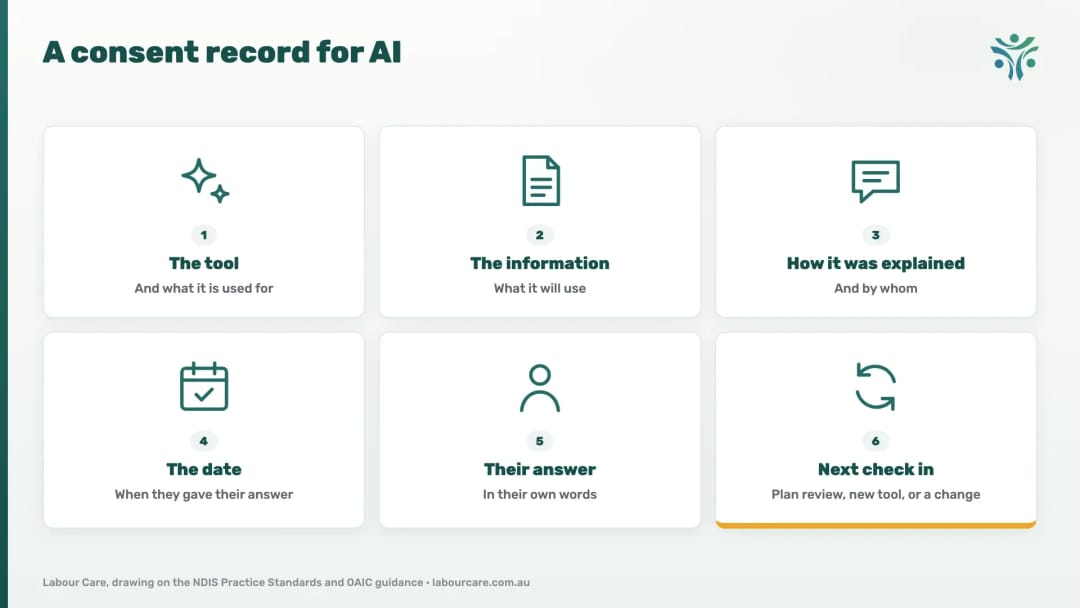
When I review a participant file, I want to see consent to AI recorded alongside every other consent, and I want it to be specific. A line agreeing to "the use of technology" is too broad to show what the participant said yes to.
A good consent record for AI shows:
- the tool, and what it is used for
- the information it will use
- how it was explained, and by whom
- the date
- the participant's answer, in their own words where you can
- when you will check in again
Consent given at the time is consent at that point in time, and a participant can withdraw it whenever they choose. So build in a check in at each plan review, whenever you add a new tool or switch on a new AI feature, and any time the participant's circumstances change. When a participant withdraws, record the date and tell every worker on their roster that day.
Our post on NDIS record keeping requirements covers how long to keep these records and where they should live.
When a participant says no to AI
Some participants will say no, and that answer deserves the same respect as a yes. I think of a participant living with a mental health condition for whom the thought of a machine reading about them causes distress. For that person, keeping AI out of their support is part of supporting them well.
The Practice Standards back that choice. Each participant is supported to make informed choices, exercise control and maximise their independence, and the provider supports their active decision making and individual choice.
This is what I would put in place for them:
- a way to deliver and record their supports with the AI features switched off, or kept away from their information
- a clear note on their file and on their roster, so every worker knows
- the same quality of support, with nothing extra asked of the participant to make it work
- a conversation at their next review if they would like one, with the decision still theirs
Then test it. If a new worker picked up their shift tomorrow, would they know?
Keep participant information in tools your business controls
The OAIC's best practice advice is to keep personal information, and particularly sensitive information, out of publicly available AI tools. In practice I would set up three things.
A business plan, with its settings checked. The business plans of two of the best known AI assistants say they do not use your business data to train their models by default, as at October
- A personal or free account can work differently. Read the terms and data settings for the plan
your team uses, and set them up when you choose the plan. The OAIC also says to review those terms and settings carefully, and to keep reviewing them, because due diligence "should not amount to a 'set and forget' approach".
"So what you need to do is look at, you know, is the information that I'm feeding into this AI part of building the language model ... or is the data that we're using on a private server?"
- Hashim Ali, CEO and Director, Labour Care
A shared rule for the team on what goes in. Where a task can be done without identifying anyone, do it that way: initials or a code in place of a name, and no dates of birth, NDIS numbers or addresses. Where a task needs participant information, use the tool your business has approved for it and nothing else.
A person who checks every output. AI tools are known to produce inaccurate or false results, so a worker reads and corrects every AI drafted note, summary or report, and the checked version is the one that goes on the participant's file. The person who signs it off is responsible for it.
Count what each tool is saving you
Using AI safely also means using it where it pays. If you are paying for seven AI tools at $90 a month each, that is $630 a month, and it is worth knowing what each one gives back.
For each tool, write down what it does, how much time it saves each week and what it costs. Keep the ones that earn their place. A couple of thousand dollars a year in subscriptions can buy less than a few hours of a person on your team who knows your participants.
Fewer tools also means fewer places participant information can travel, and a shorter list to explain to each participant.
The three documents that hold it together
Once you know your tools and your participants' choices, three documents keep it consistent as your team and your tools change.
- An AI policy. Which tools are approved, what they may be used for, what information may go into them, who checks what they produce, how participants are told and how their choices are respected, and when you review it. Keep it relevant and proportionate to the size of your service. For a small team that can be a page or two.
- An AI consent form. The record described above, in a format your participants understand.
- A staff disclosure. What each worker agrees to when they use AI at work, signed when they start and again whenever the policy changes.
Then walk your team through it. A policy works when the people on shift know what it asks of them.
Bring us what you have got
Whether you are just starting with AI or already have it running through your service, bring it to us and we will help you fix what you have got. Our team works with providers on AI policies, AI consent forms, staff disclosures and training for staff on using AI safely. If you would like your AI disclosure and consent looked at as part of a Health Check, tell us when you book. There is always someone on our team to pick up the phone.
Book a free initial consultation, or get in contact to see how we can fit your budget.
Share this article: